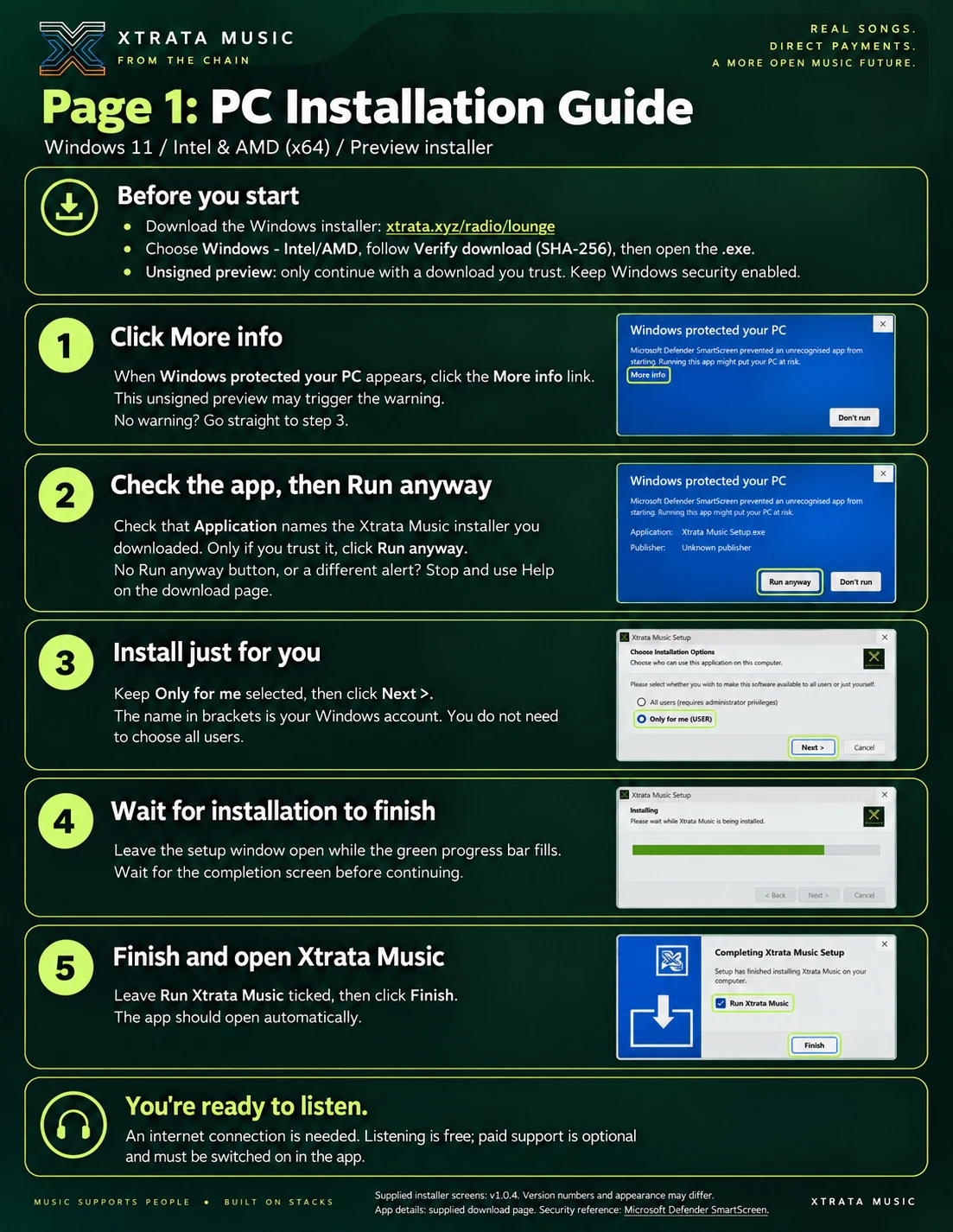
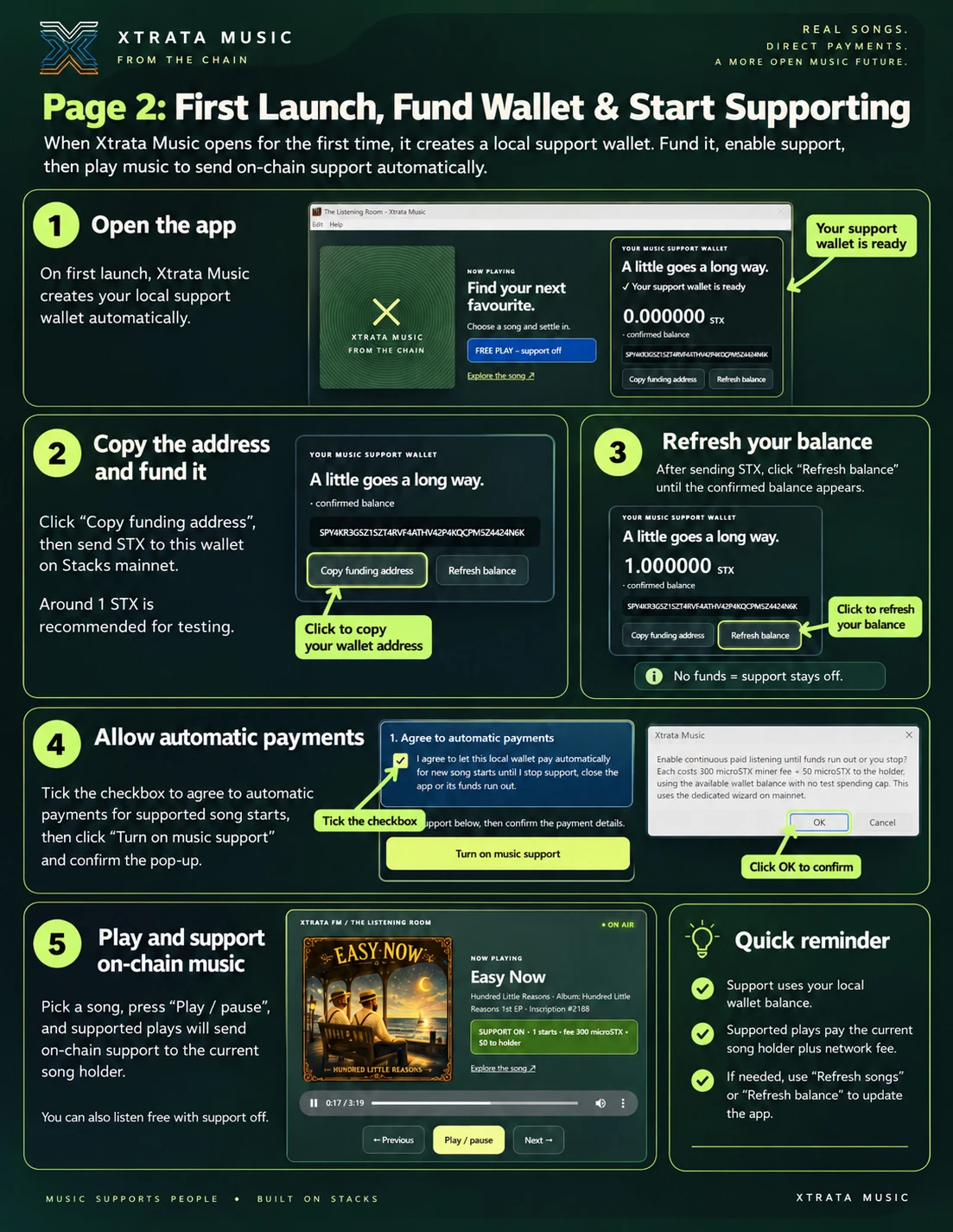
Open the app.
Install Xtrata Music. It creates your separate support wallet on your computer. You can start listening free.
THE LISTENING ROOM
An app for on-chain music. Settle in, find your favourites, and send a little support directly to the song holder as you listen.
No extension. No terminal setup in the desktop app. Free listening is always available.
Watch plays get paid live ↓ · Meet the Music Heroes →
Real songs. Direct payments. Follow confirmed on-chain support as it arrives — no wallet needed.
GET STARTED
Click a guide to open it full size. Scroll to read every step.
The screenshots show an earlier preview; use the current downloads below. Free listening is always available.
ONE APP. YOUR OWN LISTENING ROOM.
Artwork, song and album details, your wallet balance, and a clear record of every payment — together in one place.
Support is optional. Turn it on when you want new song starts to pay the current holder. Turn it off and keep listening free.
Explore the music →DOWNLOADS
Xtrata Music desktop previews are available for testing. Each download shows its own version; preview builds are unsigned.
Cross-device BNS verification links, Windows input-focus fix and resilient 503 retries. Windows 11 x64 (Intel/AMD). Unsigned beta. Native Windows automated checks passed; physical-PC and live-payment testing pending. No Node.js or extension required.
a3574e685330a46248d513bbd59f6e29911ad370e67666529647722885f79717Copyable cross-device BNS verification link and resilient 503 retries. macOS 13+. Universal Intel/Apple silicon. Unsigned beta. Automated checks passed; wider hardware and live-payment verification pending.
dc1de667fd1ef1e1565d68efe94421d05f8ad451741489d829ab8662569fbdf3Copyable cross-device BNS verification link and resilient 503 retries. macOS 12 Monterey+. Universal Intel/Apple silicon. Unsigned beta. Automated checks passed; wider hardware and live-payment verification pending.
3df766cdec29dcbd436a09be7191471b0ac422d7daba70b0aa745b11cfc69e64Optional BNS profile linking for Music Heroes. Windows 11 x64 (Intel/AMD). Unsigned beta. Native Windows automated checks passed; physical-PC and live BNS verification pending. No Node.js or extension required.
d87a13074c46f4bd3612f6e26b230333bceadff3f7feee1f6e24063b3407043fBeta build 2: in-app Xtrata logo. Windows 11 x64 (Intel/AMD). Unsigned beta. Native Windows automated checks passed; physical-PC and live-payment testing pending. No Node.js or extension required.
6d22f3804433f25c92bdecf2a5a4b7ad5d8a1e8b2140568775a7bd866f01839aWindows 11 x64 (Intel/AMD). Unsigned testing preview. Native Windows CI checks passed; physical Windows 11 and live payment testing pending. No Node.js or extension required.
97f6fb693b49d9debec049cc5a5c71eb3d54233a55e5286db5fe7d7b6e34d014Optional BNS profile linking for Music Heroes. macOS 13+. Universal Intel/Apple silicon. Unsigned beta; wider hardware and live BNS verification pending.
1b311d09284a806f5f6fd2f7e87adab7416a8676c7a6d52dffebff8133587207Optional BNS profile linking for Music Heroes. macOS 12 Monterey+. Universal Intel/Apple silicon. Unsigned beta; Monterey hardware and live BNS verification pending.
7126ac8065a71a3c0f1452cf743bf7e590f1e16d19dbf0fbcba110021a006ea3Beta build 2: in-app Xtrata logo. macOS 13+. Universal Intel/Apple silicon. Unsigned beta; wider hardware and live-payment testing pending.
b8298617734648c27ed6d95c4c4826823f7e5eb125195a0b3c9b8265788c25fdBeta build 2: in-app Xtrata logo. macOS 12 Monterey+. Universal Intel/Apple silicon. Unsigned legacy beta; Monterey hardware and live-payment testing pending.
de501bf57beace6c8730890bcb341a65f97a29256bb756292081d5585e4949d7macOS 13 or newer. Universal Intel/Apple silicon. Unsigned preview.
e6dfca2dbc6e43398f7e9d34ae2213b5ac98925ae511316489a4ff455130b5e2macOS 12 Monterey or newer. Universal Intel/Apple silicon. Unsigned legacy preview; Monterey hardware testing pending.
3599e0076e73db198c5b81ac2269669c023c99891c3b34baf34294e2c9a27371Published test builds are labelled as previews. An installed app needs internet access and an awake computer. Phones and tablets can use the free web radio.
FROM DOWNLOAD TO FIRST PLAY
Install Xtrata Music. It creates your separate support wallet on your computer. You can start listening free.
Copy the funding address shown in the app and send STX on Stacks mainnet. We recommend keeping around 1 STX here. Check that it has arrived.
Review the cost and approve support for this session. New eligible song starts can pay automatically. Funding alone never turns it on.
LIVE FROM THE CONTRACT
Every row is a confirmed paid song start recorded by the Xtrata Radio Plays contract. It shows the 0.000050 STX holder payment; the separate network fee is visible in the transaction.
Loading confirmed paid starts…
Read-only public data. No wallet connection is required. Updates are checked every 15 seconds.
LATEST FROM XTRATA MUSIC
We’re bringing the player and support wallet into one desktop app. This page is now the home for downloads, setup instructions and release news. The browser extension is no longer part of the normal setup.
Version 1.0.1 adds universal Intel and Apple-silicon downloads, plus a separate Monterey preview. Refresh songs now checks for newly indexed music immediately, with automatic playlist checks every three minutes. Tracks under one minute are skipped.
BEFORE YOU SETTLE IN
The default is 0.000300 STX in network fees plus 0.000050 STX to the current song holder: 0.000350 STX total. Xtrata charges no platform fee. You can review the fixed network fee before enabling support; it never increases automatically. A paid start records a start, not a completed listen.
On your computer, in the app’s data folder, separately from the installed app. The app manages the key for you. Losing those files can lose the balance; software with access to them can spend it. Keep around 1 STX here, rather than long-term savings. Higher balances are allowed, with a reminder.
Yes. Switch support off to keep listening free. Use Manage or return your balance in the app to review and send a return to your own address, less a network fee. Pending payments must be checked first. Closing the app stops new payments; an already submitted transaction may still confirm.
Music carries on. Starts that cannot be paid stay free, with no catch-up charges. New eligible starts can pay when the outstanding transaction resolves. Support stays on until you stop or close the app; you approve it again next time.
The desktop app uses its own wallet and does not silently copy your existing wizard wallet. Keep the old wizard files safe and return its funds before retiring it. Never delete a funded wallet folder. The original local lounge remains available while the desktop release is prepared.
Install and open Xtrata Music first. You can always launch it directly from Applications or your Start menu. Your browser may ask permission to open the app. The link never approves payments.
FIRST DESKTOP PREVIEW
Choose the standard universal download for macOS 13 or newer, or the Monterey preview for macOS 12. Both contain Intel and Apple-silicon versions. Playback and simulated wallet tests passed on Apple silicon with macOS 26.5.2; Intel and Monterey still need testing on those systems. The Windows 11 x64 preview is now available above. It passed automated Windows tests; physical-PC and live payment tests remain pending. Linux downloads are not ready yet.
For this first PC test, confirm free playback, artwork, looping and restart behaviour before funding the support wallet. See the Windows release and test evidence.
Updating? Quit Xtrata Music, replace the app in Applications, then reopen it. Your desktop wallet is stored separately and is preserved. Enable support again when ready. No Node.js or extension is needed. Your developer wizard wallet remains separate.
Preview release & testing guide ↗MAC PREVIEW · LAST RESORT
First verify that the downloaded DMG’s SHA-256 matches the value shown in its download card. If it matches and Xtrata Music is installed in Applications, this command removes quarantine from this app bundle:
xattr -dr com.apple.quarantine "/Applications/Xtrata Music.app"
This bypasses the normal Gatekeeper assessment for this copy of Xtrata Music. Try Privacy & Security → Open Anyway first. Do not add sudo, change the target to the Applications folder, or use this for a download whose checksum does not match. Signed and notarized releases will not need this fallback.